Making a contacts manager (swipe left/swipe right) from a simple spreadsheet with google apps & JS
How to turn a 3,000 email spreadsheet into a 10-minute mobile swiping session
We've all been there. You have some spreadsheet with lots of contacts or rows to organize. Maybe its leads from your recent Luma Event, maybe its conference followup, maybe its just a CRM transfer from one to the other... but there you go ahead and export a list of contacts, and then you're staring at a spreadsheet with thousands of rows.
The Problem
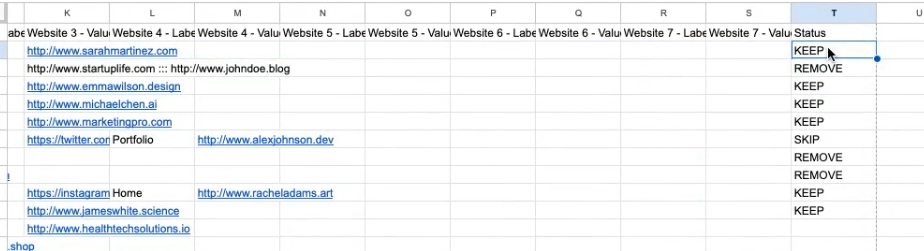
I had a list of 3K+ contacts that needed reviewing. Opening a spreadsheet and manually adding "KEEP" or "REMOVE" to each row wasn't going to cut it. I wanted something that felt natural like the same muscle memory that's simple to do on the go and lots of people use on dating apps and social their feeds or even duolingo style.
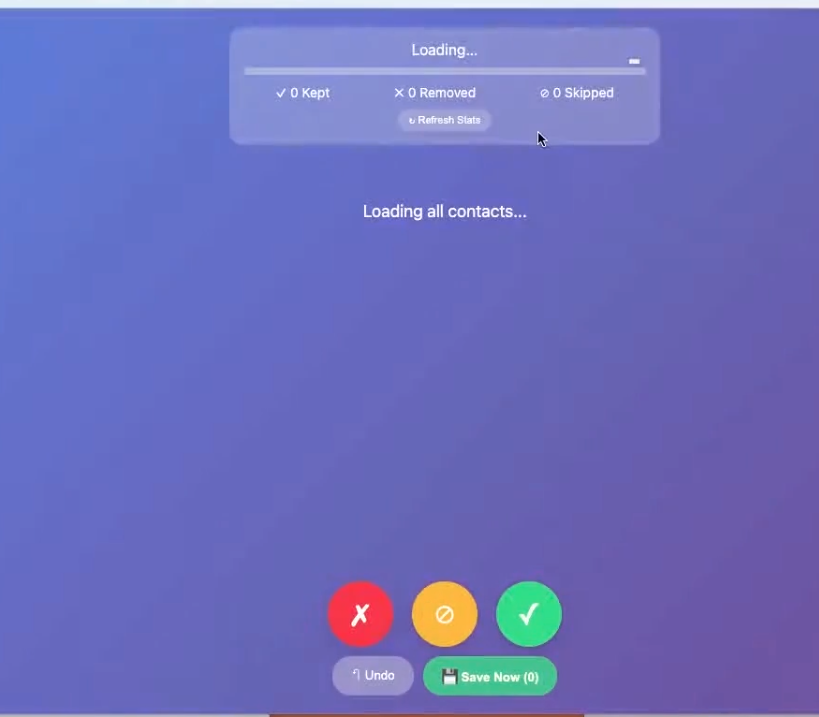
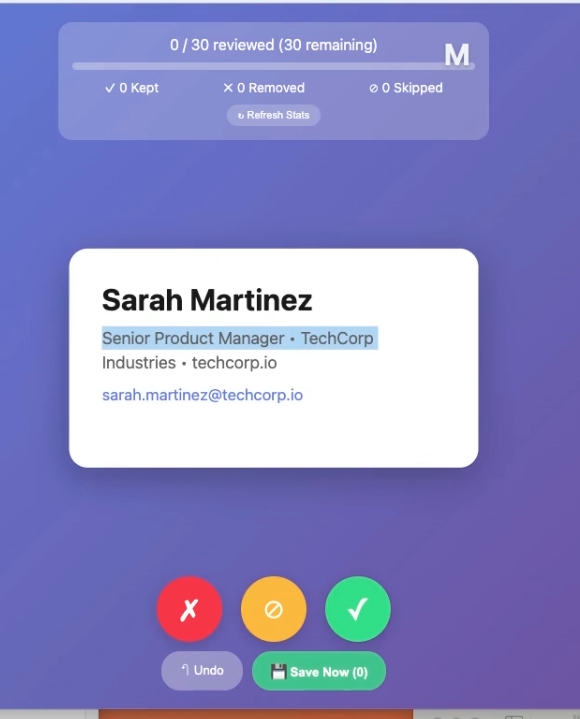
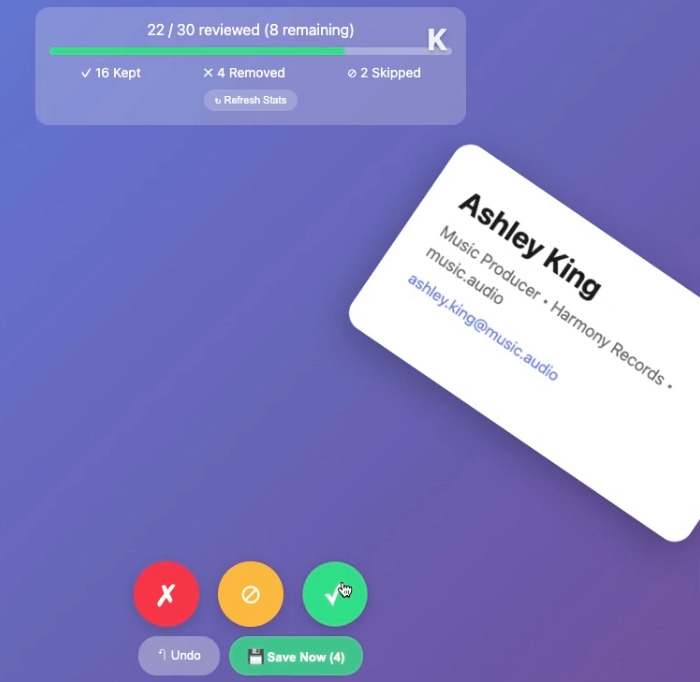
The solution: A Google Apps Script web app that serves a card-based UI, letting you swipe through contacts and automatically save decisions back to the spreadsheet.
Sure there are some names you recognize, some names you don't, people you met once at a conference three years ago. The thought of reviewing them one-by-one in a spreadsheet is... maybe feels a little soul-crushing.
So I went and built something better: a swipe-left, swipe/right contact reviewer that runs directly from Google Sheets no server required, works on mobile, and lets you triage contacts from your couch.
Here's exactly how it works, broken down piece by piece.
The Architecture
The app consists of two files inside the Google Apps Script editor:
Code.gs:: The backend. Handles reading contacts from the sheet, saving decisions, and tracking progress.Index.html:The frontend. A mobile-responsive card UI complete with touch gestures, keyboard shortcuts, and real-time progress tracking.
Let's break down it down.
Part 1: The Backend (Code.gs)
Entry Point: doGet()
Every Google Apps Script web app needs a doGet() function. This is what runs when someone visits the deployed webapp URL.
function doGet() {
  Logger.log('doGet() called - initializing web app');
  initializeSheet(); // Make sure Status column exists
  Logger.log('Sheet initialized, returning HTML');
  return HtmlService.createHtmlOutputFromFile('Index')
    .setTitle('Contact Review')
    .setXFrameOptionsMode(HtmlService.XFrameOptionsMode.ALLOWALL);
}
What's happening here:
- We call
initializeSheet()to ensure our spreadsheet has a "Status" column (more on this next) - We return the
Index.htmlfile as the response setXFrameOptionsMode(ALLOWALL)allows the app to be embedded if needed
Initializing the Sheet: initializeSheet()
The first time someone uses the app, we need to make sure there's a place to store their swiping decisions. This function checks if a "Status" column exists, and creates one if it doesn't.
function initializeSheet() {
  Logger.log('initializeSheet() - Starting initialization');

  try {
    var sheet = SpreadsheetApp.getActiveSpreadsheet().getActiveSheet();
    var lastCol = sheet.getLastColumn();
    var lastRow = sheet.getLastRow();

    // Handle empty sheet
    if (lastCol === 0 || lastRow === 0) {
      throw new Error('Sheet is empty. Please import your CSV data first.');
    }

    var headerRange = sheet.getRange(1, lastCol);
    var headerValue = headerRange.getValue();

    // If the last column isn't "Status", add it
    if (headerValue !== 'Status') {
      sheet.getRange(1, lastCol + 1).setValue('Status');
      Logger.log('Status column created successfully');
    }
  } catch (e) {
    Logger.log('FATAL ERROR in initializeSheet: ' + e.toString());
    throw e;
  }
}
Why this matters: Users don't need to prep their spreadsheet in any special way. Just import your contacts, deploy the web app using google sheets app scripts, and the Status column appears automatically.
Loading Contacts: The Performance Trick
So the natural inclications here would to fetch one contact at a time. Instead, to be more efficent, we'll batch-load all unreviewed contacts into memory at once:
// DON'T DO THIS - it's slow
function getNextContact() {
  // Fetch contact, user swipes, repeat...
  // Each swipe = another round trip to Google's servers
}

function getAllUnreviewedContacts() {
  Logger.log('getAllUnreviewedContacts() - Loading all unreviewed contacts at once');
  var sheet = SpreadsheetApp.getActiveSpreadsheet().getActiveSheet();
  var lastRow = sheet.getLastRow();
  var lastCol = sheet.getLastColumn();

  if (lastRow < 2) {
    return []; // No data rows
  }

  // Read ALL data at once (faster than individual reads)
  var allData = sheet.getRange(2, 1, lastRow - 1, lastCol).getValues();

  var contacts = [];

  for (var i = 0; i < allData.length; i++) {
    var rowData = allData[i];
    var status = rowData[lastCol - 1]; // Status is last column

    // Only include unreviewed contacts
    if (!status || status === '') {
      var lastName = String(rowData[2] || '');
      var letter = lastName.length > 0 ? lastName.charAt(0).toUpperCase() : '?';

      contacts.push({
        rowIndex: i + 2, // +2 for header and 0-based index
        email: String(rowData[0] || ''),
        firstName: String(rowData[1] || ''),
        lastName: lastName,
        organization: String(rowData[3] || ''),
        title: String(rowData[4] || ''),
        domain: String(rowData[5] || ''),
        letter: letter
      });
    }
  }

  Logger.log('Returning ' + contacts.length + ' unreviewed contacts');
  return contacts;
}
The performance gains: This means one API call loads all contacts. The frontend can then iterate through them instantly, which means no network latency between swipes. This is the difference between a frustrating, laggy experience and one that feels fast like you'd expect from this app link experience.
Saving Swiping Decisions: Batch Writes
The same principle applies to saving the descisions. Instead of writing each decision immediately, we'll batch them so its less latency:
function saveBatchDecisions(decisions) {
  Logger.log('saveBatchDecisions() - Saving ' + decisions.length + ' decisions');
  try {
    var sheet = SpreadsheetApp.getActiveSpreadsheet().getActiveSheet();
    var lastCol = sheet.getLastColumn();

    // Save all decisions at once
    for (var i = 0; i < decisions.length; i++) {
      var rowIndex = decisions[i].rowIndex;
      var decision = decisions[i].decision;
      sheet.getRange(rowIndex, lastCol).setValue(decision);
    }

    return {success: true, count: decisions.length};
  } catch (e) {
    return {success: false, error: e.toString()};
  }
}
Here we've set it up so the frontend queues up decisions and saves them in batches of 10, or when the user explicitly hits "Save Now." Wahoo!
The Undo Function
I wanted to have undo here, because we all make mistakes or sometime a name will ring a bell after you see it. Would reaching out be too awkard / feel right? Let's undo if so:
function undoLast() {
  try {
    var sheet = SpreadsheetApp.getActiveSpreadsheet().getActiveSheet();
    var lastRow = sheet.getLastRow();
    var lastCol = sheet.getLastColumn();

    // Find the most recent decision (search backwards)
    var statusColumn = sheet.getRange(2, lastCol, lastRow - 1, 1).getValues();

    for (var i = statusColumn.length - 1; i >= 0; i--) {
      if (statusColumn[i][0] && statusColumn[i][0] !== '') {
        var rowIndex = i + 2;
        sheet.getRange(rowIndex, lastCol).setValue('');
        return {success: true, rowIndex: rowIndex};
      }
    }

    return {success: false, error: 'No decision to undo'};
  } catch (e) {
    return {success: false, error: e.toString()};
  }
}
Progress Tracking for the Long Haul
I want to know how far I've gotten and how many contacts are left to go through:
function getProgress() {
  var sheet = SpreadsheetApp.getActiveSpreadsheet().getActiveSheet();
  var lastRow = sheet.getLastRow();
  var lastCol = sheet.getLastColumn();

  if (lastRow < 2) {
    return {total: 0, reviewed: 0, remaining: 0, kept: 0, skipped: 0};
  }

  var total = lastRow - 1; // Exclude header

  // Only read the Status column (much faster!)
  var statusColumn = sheet.getRange(2, lastCol, lastRow - 1, 1).getValues();

  var reviewed = 0, kept = 0, skipped = 0;

  for (var i = 0; i < statusColumn.length; i++) {
    var status = statusColumn[i][0];
    if (status && status !== '') {
      reviewed++;
      if (status === 'KEEP') kept++;
      if (status === 'SKIP') skipped++;
    }
  }

  return {
    total: total,
    reviewed: reviewed,
    remaining: total - reviewed,
    kept: kept,
    skipped: skipped
  };
}
Part 2: The Frontend (Index.html)
The Card UI
To acheive the app like behavior- we went for some nifty CSS. We want cards that feel physical:something you can grab and fling. Some umph with it.
.card {
  position: absolute;
  top: 50%;
  left: 50%;
  transform: translate(-50%, -50%);
  width: 95%;
  max-width: 500px;
  max-height: 75vh;
  background: white;
  border-radius: 20px;
  padding: 35px;
  box-shadow: 0 10px 40px rgba(0, 0, 0, 0.3);
  transition: transform 0.1s ease, box-shadow 0.1s ease;
  overflow-y: auto;
}

.card.dragging {
  cursor: grabbing;
  box-shadow: 0 15px 50px rgba(0, 0, 0, 0.4);
}
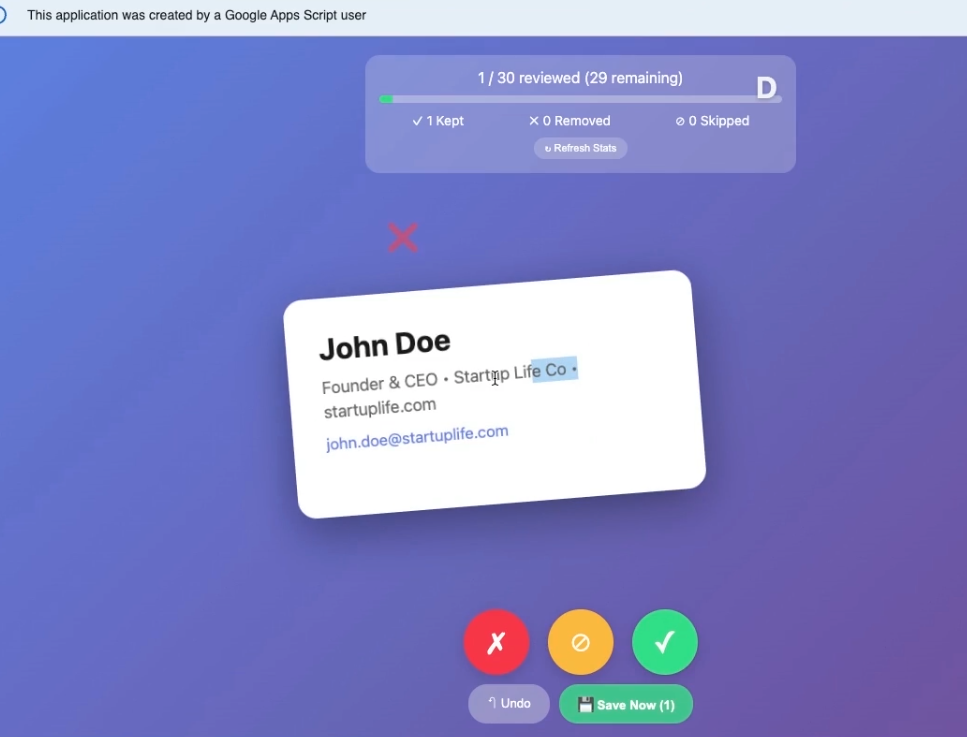
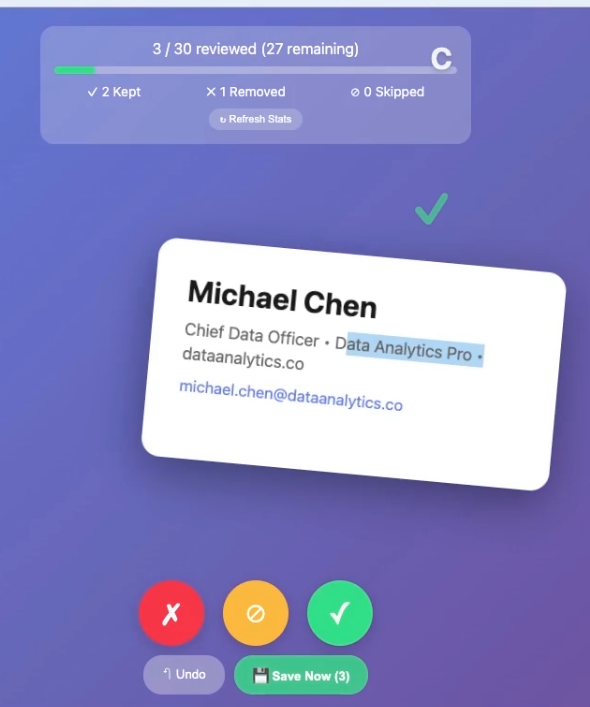
The subtle shadow increase on .dragging gives tactile feedback that something's happening.
Swipe Gesture Handling
The swipe detection works by tracking the mouse pointer position and calculating displacement or finger swipes on mobile web:
function handleStart(e) {
  isDragging = true;
  card.classList.add('dragging');

  const touch = e.type === 'touchstart' ? e.touches[0] : e;
  startX = touch.clientX;
  startY = touch.clientY;
}

function handleMove(e) {
  if (!isDragging) return;

  const touch = e.type === 'touchmove' ? e.touches[0] : e;
  currentX = touch.clientX - startX;
  currentY = touch.clientY - startY;

  const rotation = currentX / 20;
  card.style.transform = `translate(calc(-50% + ${currentX}px), calc(-50% + ${currentY}px)) rotate(${rotation}deg)`;

  // Show swipe indicators based on direction
  const leftIndicator = document.querySelector('.swipe-indicator.left');
  const rightIndicator = document.querySelector('.swipe-indicator.right');

  if (currentX < -50) {
    leftIndicator.style.opacity = Math.min(Math.abs(currentX) / 150, 1);
    rightIndicator.style.opacity = 0;
  } else if (currentX > 50) {
    rightIndicator.style.opacity = Math.min(currentX / 150, 1);
    leftIndicator.style.opacity = 0;
  } else {
    leftIndicator.style.opacity = 0;
    rightIndicator.style.opacity = 0;
  }
}
The details that matter:
- The card rotates slightly as you drag (like you're tilting a physical card)
- Swipe indicators fade in progressively:the further you drag, the more confident the visual feedback
- Works with both mouse and touch events
The Decision Threshold
When does a drag become a decision? We use a threshold of 100 pixels:
function handleEnd(e) {
  if (!isDragging) return;

  isDragging = false;
  card.classList.remove('dragging');

  const threshold = 100;

  // Check vertical swipe first (swipe up = skip)
  if (currentY < -threshold && Math.abs(currentY) > Math.abs(currentX)) {
    animateSwipe('up', 'SKIP');
  } else if (currentX < -threshold) {
    animateSwipe('left', 'REMOVE');
  } else if (currentX > threshold) {
    animateSwipe('right', 'KEEP');
  } else {
    // Reset card position
    card.style.transform = 'translate(-50%, -50%)';
  }
}
Three gestures, three outcomes:
- Swipe right → KEEP
- Swipe left → REMOVE
- Swipe up → SKIP (We'll come back to this contact later)
Keyboard Shortcuts
For power users who prefer keys to swipes:
document.addEventListener('keydown', function(e) {
  if (!currentContact) return;

  if (e.key === 'ArrowLeft') {
    e.preventDefault();
    handleDecision('REMOVE');
  } else if (e.key === 'ArrowRight') {
    e.preventDefault();
    handleDecision('KEEP');
  } else if (e.key === 'ArrowUp') {
    e.preventDefault();
    handleDecision('SKIP');
  }
});
Local Undo (Before Server Sync)
Here's a nice UX touch: if you haven't saved yet, undo is instant and local:
function undoLastDecision() {
  if (currentIndex === 0) {
    alert('Nothing to undo');
    return;
  }

  // Remove from pending batch if present
  if (pendingDecisions.length > 0) {
    const lastDecision = pendingDecisions.pop();
    document.getElementById('pendingCount').textContent = pendingDecisions.length;

    // Decrement the counter
    if (lastDecision.decision === 'KEEP') keptCount--;
    else if (lastDecision.decision === 'REMOVE') removedCount--;
    else if (lastDecision.decision === 'SKIP') skippedCount--;
  }

  // Go back one
  currentIndex--;
  showNextContact();
}
Deployment
Getting this live takes about 60 seconds:
- Open your Google Sheet with contact data
- Go to Extensions → Apps Script
- Create two files:
Code.gsandIndex.html - Paste in the code
- Click Deploy → New deployment
- Select Web app
- Set "Who has access" to yourself (or anyone, if sharing)
- Deploy
You'll get a URL like https://script.google.com/macros/s/ABC123.../exec:open it on your phone, and start swiping.
The Result
What used to be a multi-hour spreadsheet slog becomes a 10-minute swiping session. The decisions sync back to your Google Sheet automatically, where you can filter by status and export your cleaned contact list.
Key takeaways:
- Batch your reads and writes. Google Apps Script has quota limits and network latency:minimize round trips.
- Make it feel native. Touch gestures + smooth animations = an app that doesn't feel like a web page.
- Progressive feedback. The opacity-based swipe indicators give users confidence in what's about to happen.
- Respect muscle memory. Swipe right to keep (positive), swipe left to remove (negative). No learning curve required.
Get the Code
The full source is available on GitHub: https://github.com/rkrevolution/swipey
Just copy both files into your Google Apps Script project, deploy, and start triaging. Works great for:
- Email list cleanup
- CRM contact review
- Lead qualification
- Any spreadsheet that needs human judgment at scale